Renaming files using cPanel's File Manager
Overview
Often, changing the name of a file is a necessary adjustment to certain parts of a website. A file’s name can be changed by using the Rename File function in the File Manager.
Steps
1 To access the FILE MANAGER, click on the  icon above the words File Manager on the main screen of your cPanel interface.
2 Click on the icon next to the file you wish to rename.
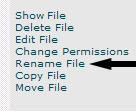
3 Click on the words Rename File on the right hand side of the screen:
4 Type the new name for the file in the blank field next to the button marked Rename.
5 When finished typing the new name of the file, click on the button marked Rename.
NOTE: If the rename was successful, the following will appear (except filename1 will be the old name of the file, filename2 will be the new name, and /home/folder will be the name of the directory you are in):
Renamed filename1 -> filename2 in /home/folder/
Troubleshooting
When renaming files, make sure to keep the same file extensions or they may not be able to be executed or viewed.



