Viewing a file's contents
Overview
You can use the File Manager to view the text inside a text or script file, or to view the image from an image file by using the Show File Contents option.
Steps
1 To access the FILE MANAGER, click on the  icon above the words File Manager on the main screen of your cPanel interface.
2 Click on the icon next to the file which you wish to view the contents of.
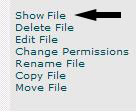
3 Click on the words Show File or Show File Contents on the right side of the screen:
4 A new window will appear containing the contents of that file.
5 To return to the File Manager simply close the window containing the file’s contents.
Troubleshooting
The file’s contents are viewed in a separate window. You will need to close the window or go back to your other browser window to return to the file manager.



